







Utilities Quick Guide Residential
Before Moving In
Notes:
- You will receive an SMS notification confirming receipt of your application.
- You will receive an email and letter confirming appointment date & time after application is successfully processed.
- Rescheduling of appointments are subject to availability of time slots.
After Moving In
Notes:
- Please allow 7 business days lead time after opening of account.
- Regardless of whether you are signing up with a retailer or SP, you would still have to open a utilities account with us.
Moving Out
Notes:
- Please allow up to 30 business days to receive your refunded deposit.
- If you are moving into a new premises, you will need to open a new account after closing your account at your old premises.
Opening Your Residential Utilities Account

Who can apply
Who can apply
Singaporeans, PRs and foreigners with valid documentation aged 18 years and above
Application Channels
Application Channels
- SP app - iOS and Android
- Open Utilities Account Portal
- Customer Service Centre
Tip: Use MyInfo during application process for greater convenience and accuracy in filling up personal details.
Required Documents & Security Deposit
Required Documents & Security Deposit
Please prepare the following documents:
- Identification documents
- Proof of Ownership / Tenancy
Information on Security Deposit*
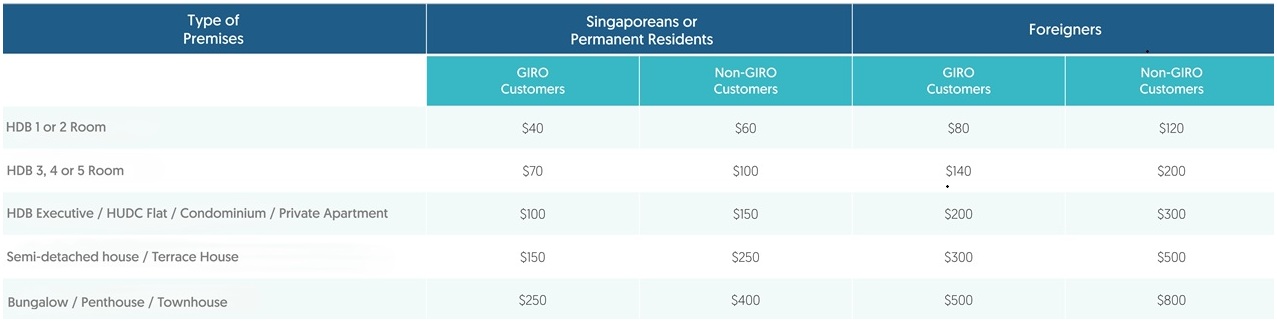
* Security Deposit will be charged to the first utilities bill.
Account Activation & Turn-On Appointment
Account Activation & Turn-On Appointment
- Your account will be activated on your preferred date.
- You may be required to arrange a turn-on appointment during the application. Please allow a 1-week lead time from your application date for your turn-on appointment.
- HDB BTO flats: No appointment is required to turn on electricity and water supply.
- Resale HDB and other residential properties: A safety inspection will be done on site to turn on electricity and water supply. The account holder or a representative must be present for the turn-on appointment. This does not apply if you are transferring the account and there is no interruption to your utilities supply.
- Gas supply: Gas activation is managed separately by City Energy. Once your account opening is confirmed, please call 1800 555 1661 to arrange an appointment.
- Appointment availability: Appointments are allocated on a first-come, first-served basis. Please allow at least one week's lead time when booking an appointment.
Managing Your Utilities
Manage your utilities account with the SP app or SP Utilities Portal on the go
Manage your utilities account with the SP app or SP Utilities Portal on the go
- View and pay your bills
- Manage and update your personal details
- Update your billing preference
- Set up recurring payment arrangement (available via the SP app)
- Monitor your current and historical utilities consumption
- Access e-services such as refund request and fee waiver
- Buy at Wholesale Electricity Price#
- Live Chat^
# Available only via SP Utilities Portal
^ Available only via SP app
Submit Meter Readings
Submit Meter Readings
Avoid estimated bills by submitting your meter readings monthly.
- SP app
- Click “Explore” under the homepage, followed by “Meter Reading”.
- Follow on-screen instructions.
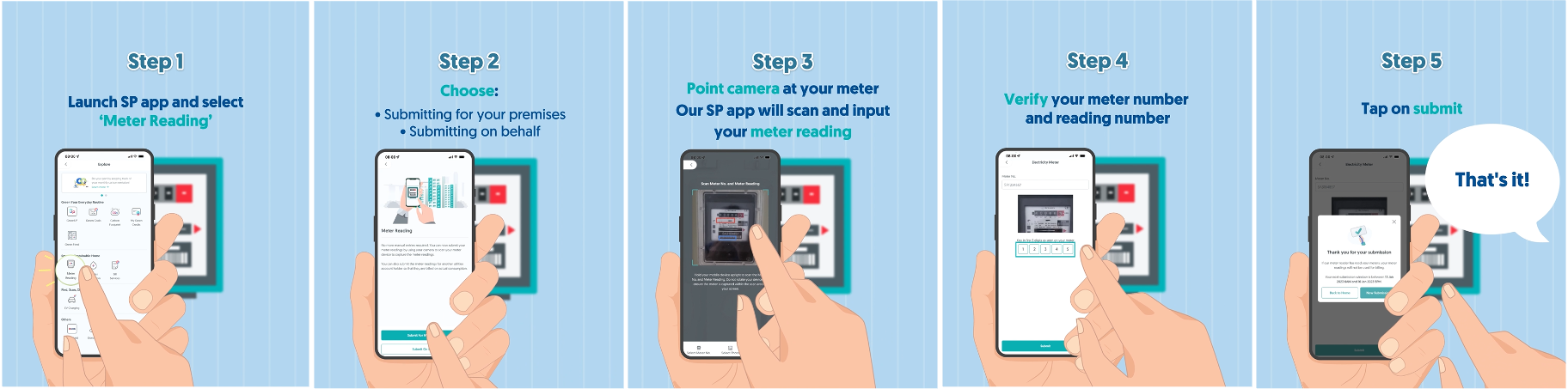
Other submission methods
- SP Utilities Portal
- Telephony IVR
Paying Your Utilities Bills
Paying Your Utilities Bills
Pay your utilities bills via the following convenient methods:
- eGIRO* via the SP app or SP Utilities Portal
- Credit/Debit* card payment via the SP app
- PayNow QR via the SP app or SP Utilities Portal
- Internet Banking
- AXS stations
- 7-Eleven stores (not available for account numbers starting with ‘93’)
- DBS/POSB/OCBC Automated Teller Machines (ATMs)
* Recurring payment arrangement available.
Switching to Another Electricity Provider
Switching to Another Electricity Provider
You can choose to buy electricity from an electricity retailer that best meets your household needs. Switching can be done in 3 easy steps:
- Check out price plans that retailers are offering.
- Contact your preferred retailer to better understand the terms and conditions of the offered price plan.
- Sign up with the retailer.
Your retailer will work with us to facilitate a seamless switch for you. Click here to find out more.
Alternatively, you can choose to buy electricity from the SP Wholesale Electricity Market.
Closing Your Utilities Account
Channels available to close your account
Channels available to close your account
- SP app - iOS and Android
- Close Utilities Account Portal
- Customer Service Centre
Other information
- If you buy electricity from a retailer, please contact your retailer directly to close your electricity account.
- Your utilities account will be closed automatically when the new occupant opens a utilities account for the same premises.
- Once your utilities account is closed, any remaining security deposit will be refunded after deducting any outstanding charges on your final bill.
- A gas service termination fee applies.
What to note when closing your account
What to note when closing your account
- Your security deposit will be used to offset the final charges. Any credit balance will be refunded through your preferred method.
- GIRO arrangement will automatically be terminated after the final charges have been deducted from your GIRO account.
- For termination of gas supply, City Energy charges a termination fee. Please check with City Energy for more information.